 WaSparks
A customer messages your business at 9:40 on a Sunday night: “Hi, what are your prices?” Nobody is in the office. By the time someone replies on Monday, the customer has already messaged two of your competitors.
Automation can fix that, but many businesses avoid it because the old way of building it was painful. Scripts, webhooks, JSON files and a developer who is no longer around. A visual flow builder changes that. You draw the conversation, test it, and change it yourself.
Why traditional chatbot setups frustrate small teams
They need a developer. Rules live in code, so a simple wording change turns into a ticket.
They are invisible. When something goes wrong, nobody can see what the bot did or why.
They trap customers. A bot with no way out repeats “I did not understand” until the customer gives up.
They are hard to start. Staring at a blank screen is the biggest reason automation never gets built.
How a visual flow works
A chat flow is a sequence of steps that you lay out on a canvas. Each step does one small thing, and you connect them in order.
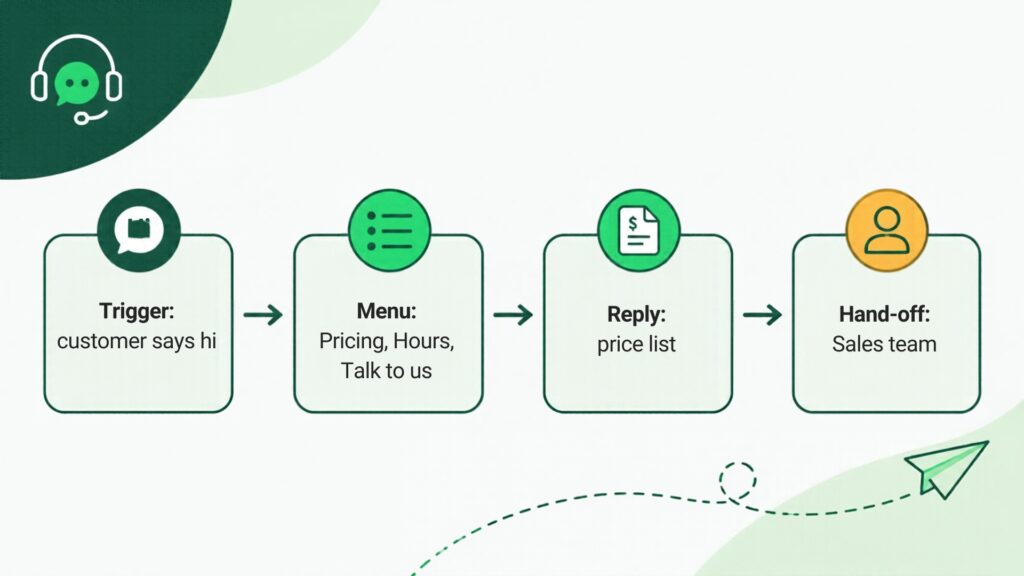
A typical flow looks like this:
- Trigger. Something starts the flow, such as a customer saying hi.
- Menu. The customer picks what they need: Pricing, Hours or Talk to us.
- Reply. The flow sends the matching answer, such as this week’s price list.
- Hand-off. If the customer needs a person, the chat goes to your team in the inbox. A flow can also route the chat to a chosen team member automatically.
Because you can see the whole path on one screen, you can spot gaps before customers do.
What can start a flow
WaSparks flows can be triggered by:
- A keyword the customer types
- A customer’s first message
- A message sent outside your opening hours
- A new order
- A call to the API
Each trigger suits a different job. Keywords suit specific requests like “price”. First message suits a welcome menu. Outside opening hours suits an after-hours reply. A new order suits an order confirmation. The API suits flows your own systems start.
See it live: See how a welcome menu feels from the customer’s side. Tap here to test on WhatsApp (replies in under 5 seconds)
Start from a preset instead of a blank canvas
WaSparks includes five ready-made flows. You can change any step or build your own.
- Welcome menu. Greets new chats and lets customers pick what they need.
- After-hours reply. Answers when you are closed and says when you will be back.
- Lead capture. Asks a few questions and passes the answers to your team.
- Price list. Sends prices for what the customer asks about.
- Order confirmation. Confirms an order and passes anything else to your team.
Pick the one closest to your need, replace the wording with your own, and test it.
Keep the flow useful: four design rules
Keep menus short. Three or four options are easier to choose from than eight.
Always offer a person. Every menu should include a way to reach your team. A flow that answers common questions and hands off the rest is far more welcome than one that tries to handle everything.
Say who is speaking. Start with your business name and what the customer can do here.
Write like you speak. Short, plain sentences. Avoid jargon.
See what your flow actually did
Every conversation a flow handles is logged step by step. If a customer says the menu did not work, you can open the log and see exactly which step they reached. That makes improving a flow a matter of reading what happened, instead of guessing.
How many flows you can run
The number of flows depends on your plan. Ember, the free 30-day trial, includes 1 flow. Spark includes 5. Blaze and Inferno are unlimited. See the pricing page for the full comparison.
A first flow you can build today
If you have never built one, start with the after-hours reply.
- Choose the After-hours reply preset.
- Write your opening hours and when you will reply.
- Add a line telling customers what to do if it is urgent.
- Save and test it by messaging your own number outside your set hours.
It takes a few minutes and removes the silent Sunday-night problem. Once it works, add a welcome menu.
The takeaway
Automation does not need code or a developer. A visual canvas, a few presets and a clear way to reach a person are enough to answer common questions fast and send the rest to your team. You can read more on the chat flows page, or start free for 30 days and build your first flow.
Found this useful? Share it with your team.