
NewFlint, an assistant that answers from your own FAQMeet Flint

WhatsApp Business, run like infrastructure.

One inbox for your whole team, with templates, campaigns, automation and the API on the same workspace — and quality rating, tier and cost in view before every send.

Built on Meta’s official WhatsApp Business Platform

Riya S.+91 98••• ••421 23h 52m left in window
  1. Hi! Has order #4821 shipped yet?

  2. Assigned to Priya · Support
  3. Yes — it left our warehouse this morning and arrives Thursday. Tracking link below.

  4. Delivered and read · reply sent inside the 24-hour window
Quality rating
Green
Messaging tier
1K / 24h
Team inbox
12 open
Sample conversation — names and numbers are illustrative.

One system. Five consoles.

Inbox, campaigns, templates, health and cost, all reading from one number, one tenant and one audit log.

Real WaSparks screens · sample data · tenant kavya-dental

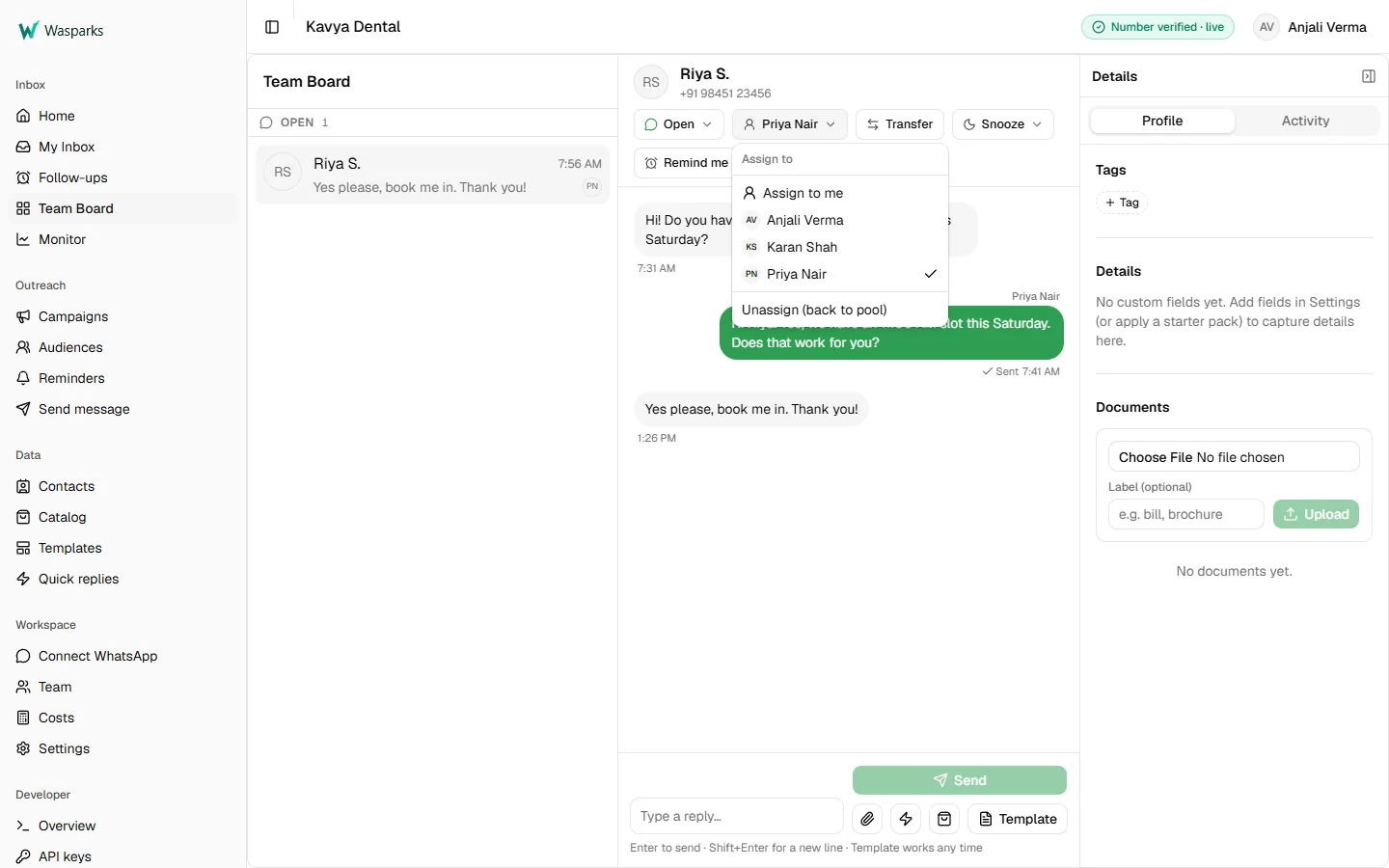
WaSparks team inbox with a customer conversation open and the Assign menu listing team members, Priya Nair selected

Team inbox

Every chat is a work item. Assign it, hand it on with a reason, see who owns it. The composer knows when the 24-hour window has closed and only an approved template will send.

  1. Assign, or transfer with a noted reason
  2. Snooze a chat or set a follow-up reminder
  3. Templates and quick replies from the composer
  4. Images and documents stored with the contact
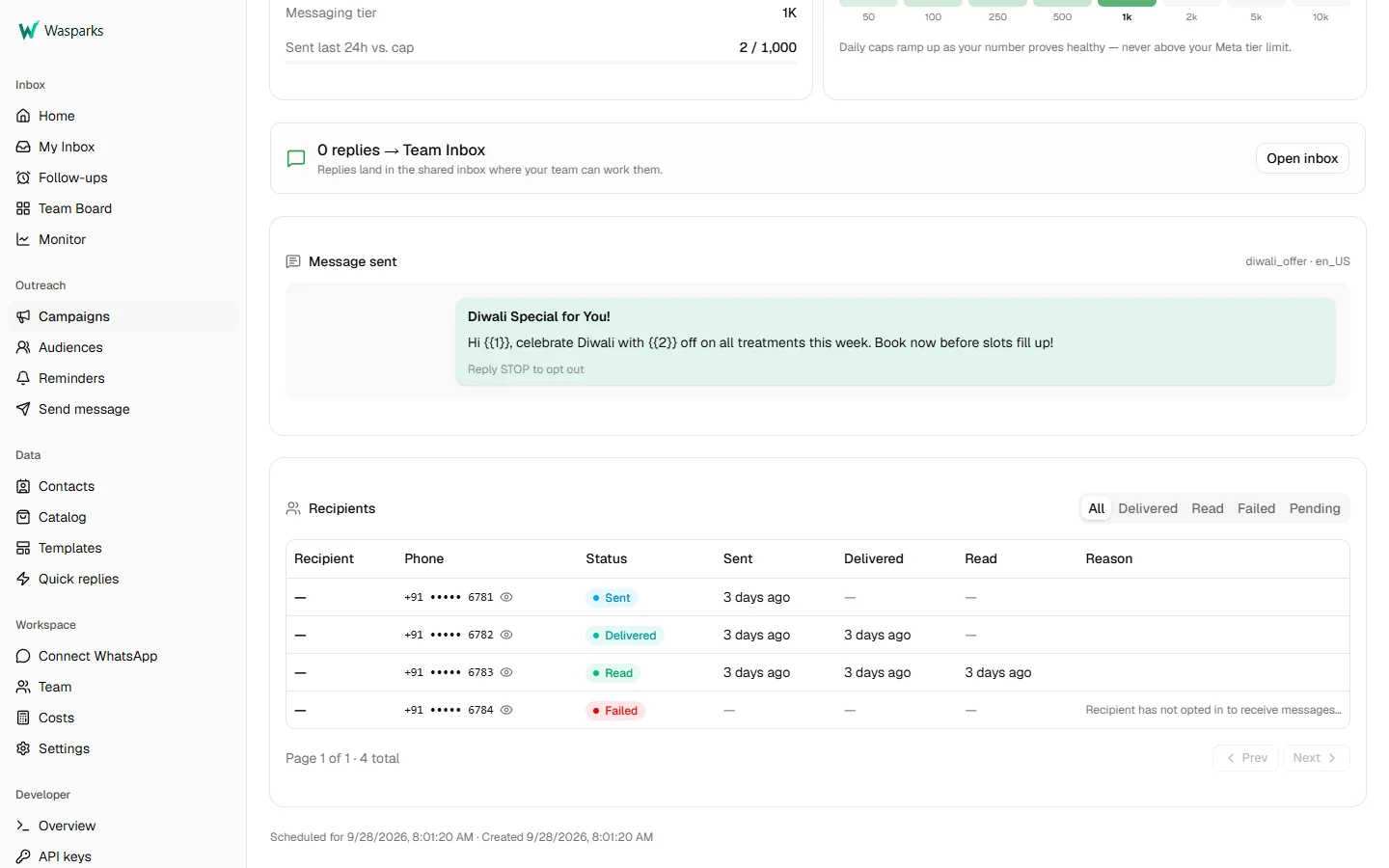
WaSparks campaign detail showing the message sent and a recipient table with masked numbers and sent, delivered, read and failed statuses, including a failure reason

Campaigns

Upload a CSV, map its columns to template variables, schedule. Sending stays inside your Meta tier and daily cap, and every recipient comes back as sent, delivered, read or failed, with the reason.

  1. Per-recipient status, timestamps and failure reasons
  2. Numbers masked; Owner and Admin can reveal
  3. STOP suppresses a contact from every campaign
  4. Replies land in the team inbox, counted
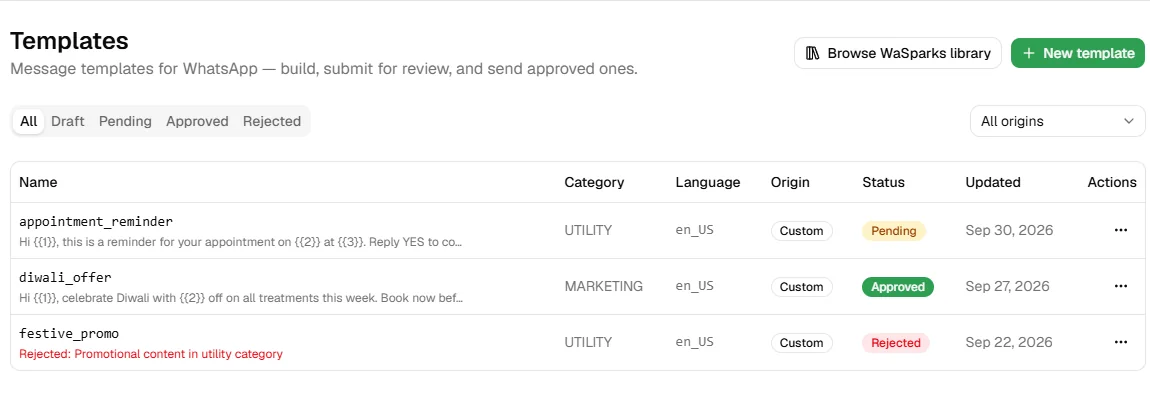
WaSparks templates list with an approved marketing template, a pending utility template and a template rejected by Meta with the rejection reason

Templates

Write a template, submit it to Meta, and watch the status change on its own: approved, rejected with the reason, or paused.

  1. Marketing, Utility and Authentication categories
  2. Status synced by webhook, no refreshing
  3. Rejected templates show Meta’s reason
  4. URL, copy-code and media-header buttons
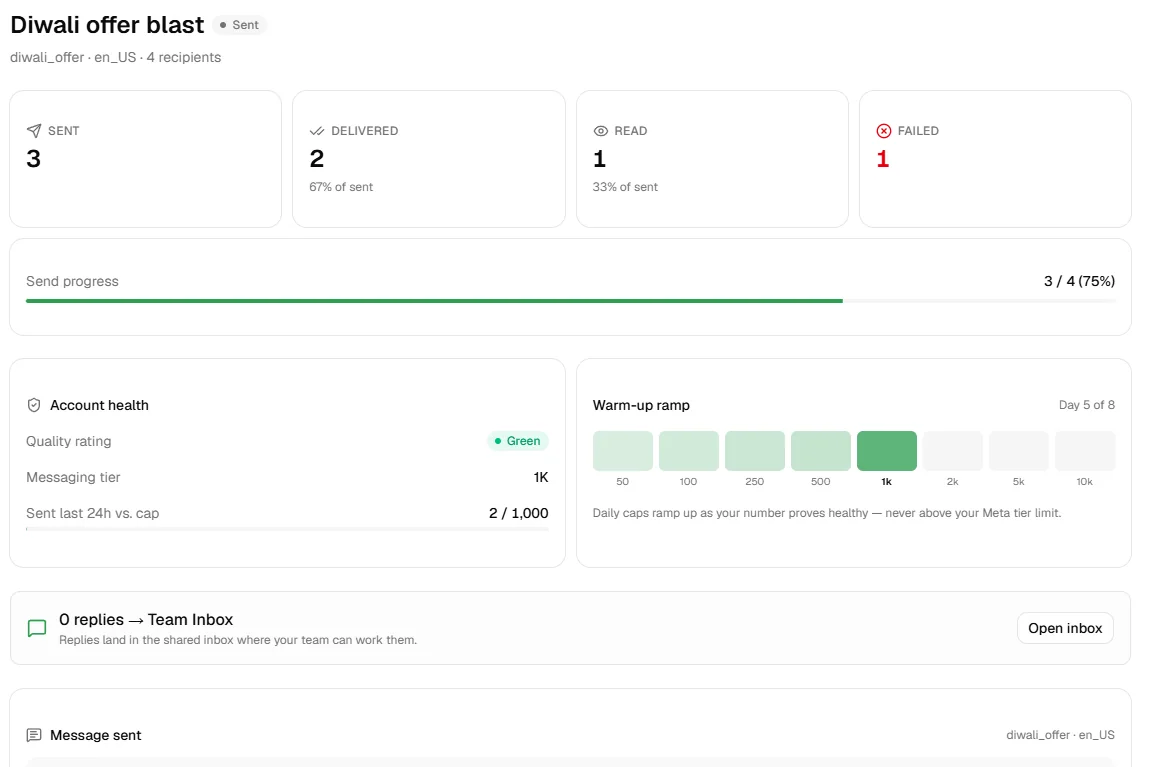
WaSparks campaign summary with sent, delivered, read and failed counts, a green quality rating, a 1K messaging tier and the warm-up ramp on day 5 of 8

Account health

Your number’s quality rating and messaging tier, read from Meta and shown where you send, so a campaign never goes out blind.

  1. Quality rating: green, yellow or red
  2. Messaging tier: 250, 1K, 10K and up
  3. Warm-up ramp for new numbers
  4. Auto-pause when quality degrades
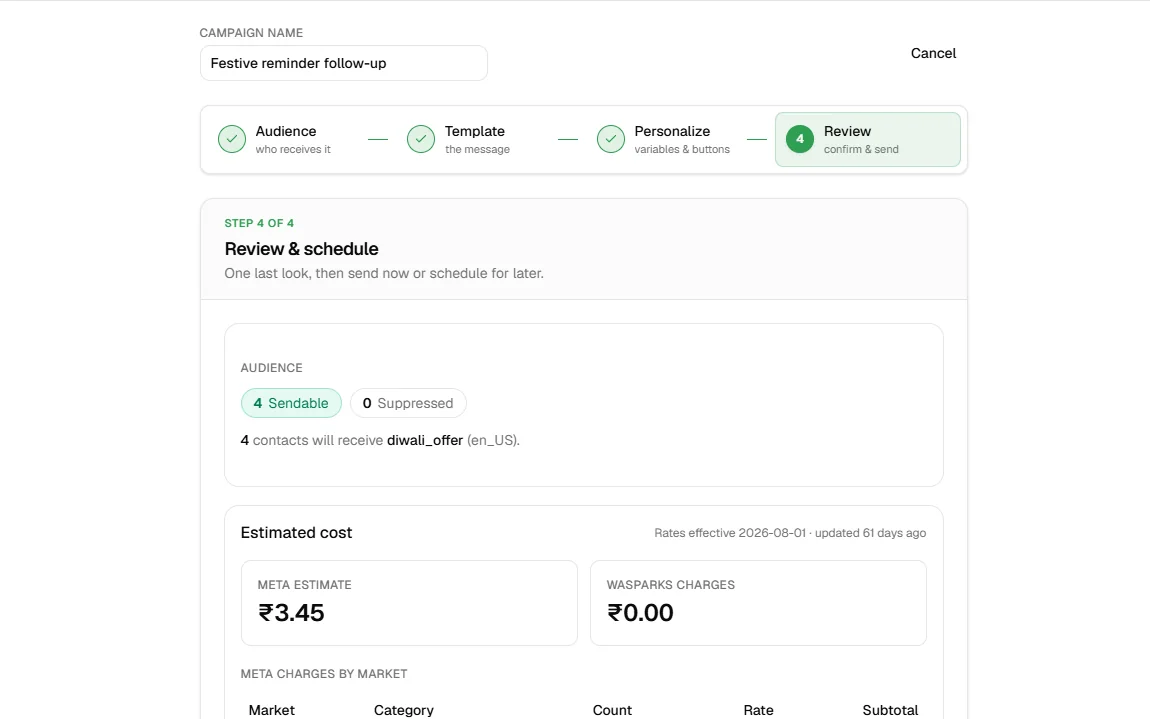
WaSparks campaign review step showing four sendable contacts and the estimated Meta cost in rupees before sending

Cost before you send

WaSparks keeps Meta’s rate card in INR and USD, estimates a campaign at review, and pulls the actual spend afterwards. Meta bills on delivery, so undelivered messages don’t count.

  1. Rate card across countries and categories
  2. Estimate shown at campaign review
  3. Actual spend from Meta, per-message pricing from webhooks

Try it on your own number.

Start 30 days free

New · October 2026

One conversation. Everything new in it.

Follow one customer from hello to booked: on the number you already use, with a chat flow, Flint and your team each doing their part.

  1. Your numberThe one already in your WhatsApp Business app, or a dedicated one.
  2. A chat flow greets themBuilt on a visual canvas, starting from a preset.
  3. Flint answers PilotFrom your business profile, FAQ and catalog, inside the 24-hour window.
  4. Flint hands offNot sure? It says so, and the chat waits in the inbox, tagged.
  5. Flint drafts, your team sendsQuick replies, templates, product copy and product picks, drafted for you to review. Free on every plan.
Neha K. +91 98••• ••421 · linked app number
  1. Hi!

  2. Synced from the WhatsApp Business app
  3. Chat flow · Welcome menu

    Welcome to Glow Studio! Pick one: Hours · Prices · Book a slot

  4. Are you open on Sunday? And how much is hair colour?

  5. Flint · from your business profile

    Yes, we’re open 10 am to 6 pm on Sunday.

  6. Flint

    Colour depends on hair length, so I’ve asked Priya to confirm the price.

  7. Handed to Priya · tagged pricing
  8. Flint suggests

    Global colour, shoulder length · ₹2,500

  9. Priya

    It’s ₹2,500 for shoulder length. Shall I book Sunday at 11?

Sample conversation — names and prices are illustrative. Flint answering is in pilot: ask us to switch it on for your account.

Two ways to connect your number.

App-linkedDedicated
Team inbox, campaigns, chat flowsYesYes
Your last 6 months of chats and contacts come alongYesNo
WhatsApp Business app keeps working on your phoneYesNo
Product-catalog sendingNoYes

Keep the number you already use. Already chatting with customers in the WhatsApp Business app? Link it to WaSparks and use both: the app on your phone for one-to-one, WaSparks for your team, automation and campaigns. Your last 6 months of chats and your contacts come along. Nothing is deleted.

Or connect a dedicated number. A number just for WaSparks, with every feature of the platform.

Linking an app number needs WhatsApp Business app version 2.24.17 or newer, with the phone in hand. Product-catalog sending is not available on app-linked numbers; everything else works. Existing broadcast lists in the app become read-only.

Chat flows: automation you can see.

Build menus, questions and hand-offs on a visual canvas. Start from a preset and change anything. Every conversation a flow handles is logged step by step.

See how chat flows work →

  • Welcome menu
  • After-hours reply
  • Lead capture
  • Price list
  • Order confirmation

Settings that explain themselves.

Every setting says why it matters and what it changes. Set your business profile once; Flint, reminders, campaigns and after-hours replies all use it.

A home screen that tells you what needs you now, what ran on its own while you were away, and what to do next.

The controls IT signs off on.

Follow one customer message through WaSparks. Every step is a live control that runs on its own, for every business on the platform.

Sample trace. Names and numbers are illustrative.

Inbound message Riya S. → Kavya Dental
STOP
  1. Verified number

    It lands on a number connected through Meta’s Embedded Signup, inside WaSparks.

    ConnectedVerifiedLive

  2. Tenant isolation

    It is routed to one business. Its data never crosses into another.

    Kavya DentalPink City Motors

  3. Opt-out, enforced

    STOP suppresses the contact across the whole account, automatically.

    contact Riya S.status suppressed from every future campaign

  4. Roles

    The agent sees the conversation, not the customer’s full number.

    admin +91 98451 23456agent +91 ••••• 23456

  5. Audit log

    Each action is recorded with who did it and when.

    10:42 System suppressed contact · Riya S.10:43 Priya N. closed conversation

  6. Signed webhook

    The event goes on to your own systems, HMAC-signed.

    event message.receivedsignature sha256=9f2c…e41a

In production.

Counted across the WaSparks platform, October 2026.

6,000+ WhatsApp messages sent through WaSparks
100+ Message templates created on the platform
Live On Meta’s official WhatsApp Business Platform, with verified numbers sending today

Set up for how your customers talk.

Seven industries, one platform. Pick yours to see the kind of message WaSparks sends for it.

All solutions

E-commerce & D2C

  • COD orders confirmed before dispatch
  • Abandoned-cart nudges from your store
  • Delivery questions assigned to a person
E-commerce & D2C solution

Retail

  • Offers to customers who opted in
  • Your catalog sent inside the chat
  • Order updates, with orders landing in the inbox
Retail solution

Cafes & restaurants

  • Reservations confirmed and assigned
  • Order-ready alerts for pickups
  • Regulars’ usual orders remembered
Cafes & restaurants solution

Salons & spas

  • Appointment reminders the day before
  • Bookings owned by the right stylist
  • Client history that stays when staff leave
Salons & spas solution

Clinics & doctors

  • Appointment and refill reminders
  • Front desk to doctor, with context
  • Patient history any staff can pick up
Clinics & doctors solution

Schools & coaching

  • Admission enquiries answered from one inbox
  • Fee reminders with a payment link
  • Broadcasts to parents, with opt-outs respected
Schools & coaching solution

Automotive dealerships

  • Service reminders by date or mileage
  • Test-drive bookings and follow-ups
  • Leads assigned to the right sales advisor
Automotive dealerships solution

Build on it, or run it for clients.

Developers

Send from your own stack. An asynchronous send API with a Meta-compatible request shape, HMAC-signed webhooks, a sandbox, and keys you manage in the app.

cURL · illustrative202 Accepted
curl -X POST "$WASPARKS_API/messages" \
  -H "Authorization: Bearer $WASPARKS_KEY" \
  -H "Content-Type: application/json" \
  -d '{
    "messaging_product": "whatsapp",
    "to": "$RECIPIENT",
    "type": "template",
    "template": {
      "name": "order_shipped",
      "language": { "code": "en" }
    }
  }'

Partners

Run WhatsApp for your clients from one partner console.

  • Headless client businesses under your account
  • Hosted setup links to onboard each client’s number
  • Campaigns and audiences over the API
  • Inbound messages and media delivered to you
  • FIXED or METERED billing plans

Who builds WaSparks.

WaSparks is built and run from Jaipur, India.

Growing teams kept telling us the same thing: customer conversations were scattered across shared phones, personal WhatsApp accounts and spreadsheets, with no record of who said what. I built WaSparks on Meta’s official WhatsApp Business Platform so every number, team and conversation sits on real infrastructure — with the controls a serious operation expects.

Romil Sarna Founder & CTO LinkedIn (opens in a new tab)
Company
WASPARKS
Based in
Malviya Nagar, Jaipur, India
Hours
Mon–Fri, 9:00–18:00 IST

About WaSparks Contact us

Before you get started.

The questions we hear most from IT, ops and finance.

Do we need our own WhatsApp Business Account?

Yes. You connect your number through Meta’s Embedded Signup inside WaSparks, and it is mapped to your WhatsApp Business Account. The account and the number stay yours.

How is WhatsApp messaging priced?

Meta charges per delivered message, by country and message category, and bills it to your WhatsApp account directly, not through WaSparks. WaSparks shows a campaign’s estimated cost before it sends and the actual spend afterwards, from Meta’s own data. Messages that are not delivered are not billed by Meta.

What happens when a customer replies STOP?

The contact is suppressed across your whole account and excluded from every future campaign. Nobody has to clean the list by hand.

Can we run several brands or business units?

Yes. Each business is its own tenant, with isolated data and its own roles. Agencies and resellers use the WaSparks partner platform to manage client businesses.

How does WaSparks protect our number’s quality rating?

WaSparks reads your quality rating and messaging tier from Meta and shows them where you send. New numbers ramp up through a warm-up schedule, sending stays inside your tier’s daily cap, and campaigns pause automatically if quality degrades.

Can our developers integrate directly?

Yes. The API accepts messages asynchronously and sends HMAC-signed webhooks for delivery status, inbound messages and template events. API keys are created in your WaSparks account, there is a sandbox for testing, and the full API reference is public at developers.wasparks.com.

Start on your own number.

Sign up, connect your number with Meta’s Embedded Signup and send your first approved template. Prefer a walkthrough? We’ll show your team the inbox, a test campaign and its cost estimate.