Every tool for business messaging, on one number.

Inbox, templates, campaigns, catalog, reminders, cost and an API, built on Meta’s official WhatsApp Business Platform.

Draft a template. Watch it pass.

This is how a template takes shape in WaSparks. Pick a category, write the message and add buttons. The checks are Meta’s format rules; approval also depends on Meta’s content review.

Category

Offers, announcements and re-engagement. Send only to customers who opted in.

Lowercase letters, numbers and underscores.

Use {{1}}, {{2}} for details that change per customer. *Bold* and _italic_ work as in WhatsApp.

Sample values (Meta reviews with these)

Buttons (up to 3 here)
  • Website
  • Quick reply

How your customer sees it · sample values

Festive offer

Hi Asha, our festive sale is on. Use code FEST20 for 20% off until Sunday.

  • Shop the sale
  • Not interested

Format checks

  • Body is 1–1,024 characters
  • Variables are numbered in order
  • Body doesn’t start or end with a variable
  • Every variable has a sample value

Meta charges marketing messages per delivery, at a rate set by the customer’s country. WaSparks shows the estimate before you send.

Everything in the box.

Grouped by the job it does. Every item here works in WaSparks today.

Team inbox

Every customer chat in one shared inbox, worked like a task.
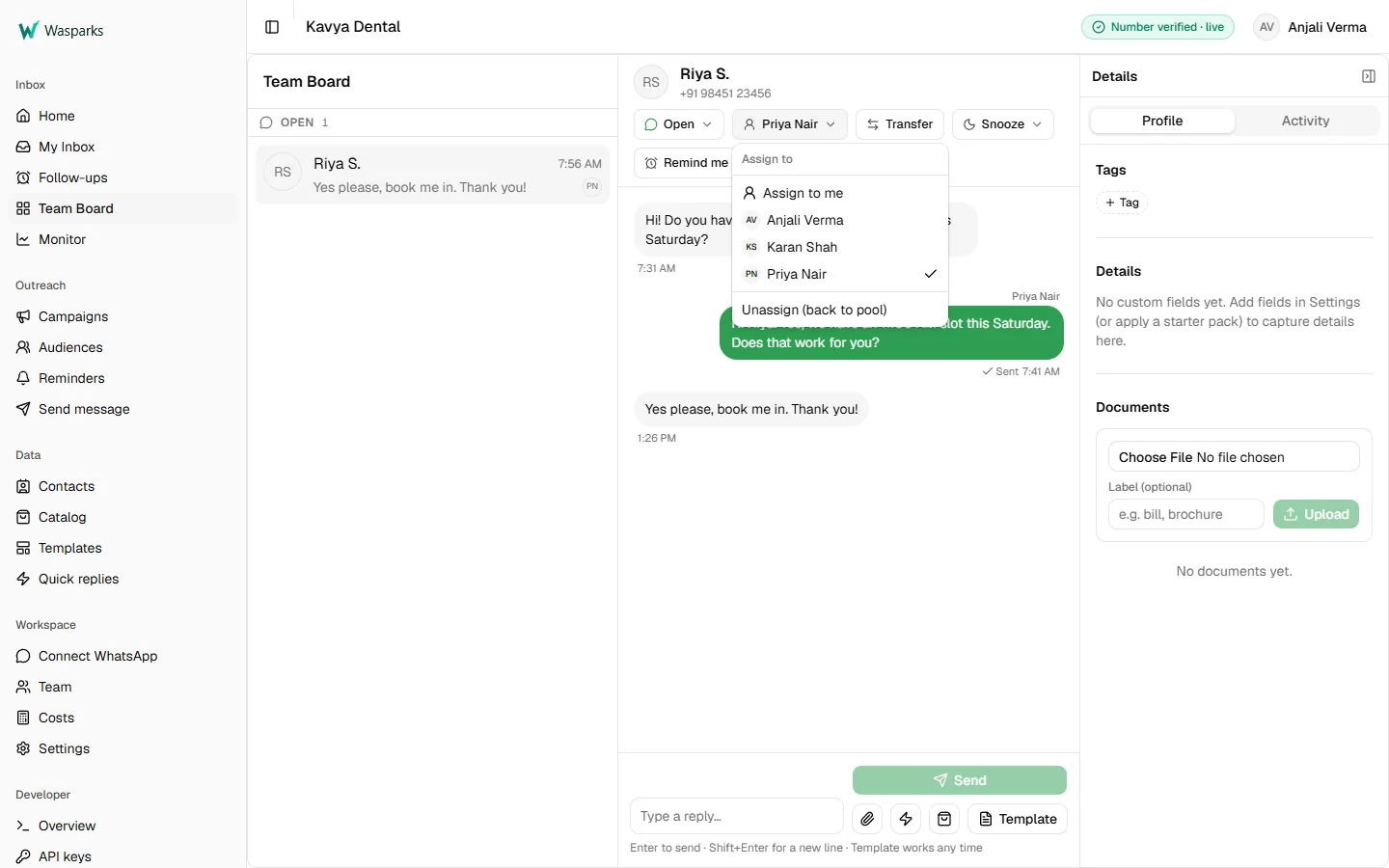
WaSparks team inbox with a customer conversation open and the Assign menu listing team members, Priya Nair selected
One number, whole team
Everyone answers from the same WhatsApp Business number.
Assign and transfer
Give a chat to a teammate, or hand it on with the reason noted.
Unread tracking
See what’s new the way WhatsApp shows it.
24-hour window, handled
Reply freely while the customer’s window is open. Once it closes, WaSparks asks for an approved template.
Quick replies
Saved answers, shared with the team or kept personal, as text, images or documents.
Templates in the chat
Send any approved template, with its header, buttons and media, without leaving the conversation.
Media both ways
Send images and documents. Files customers send are stored with the chat.
Templates

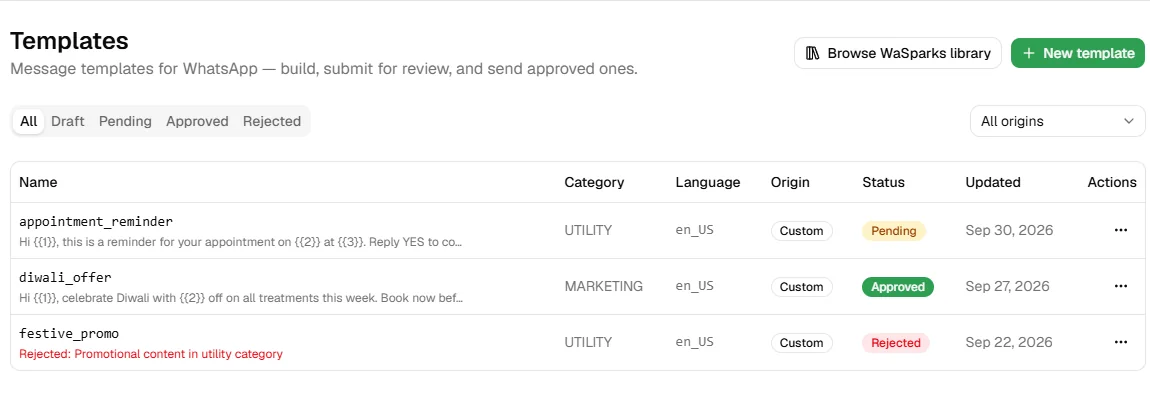
Write once, submit to Meta, and always know where each template stands.

WaSparks templates list with an approved marketing template, a pending utility template and a template rejected by Meta with the rejection reason
Create and submit
Draft a template and submit it to Meta for review from WaSparks.
Status that updates itself
Approved, rejected or paused, synced from Meta, with the rejection reason when there is one.
All three categories
Marketing, utility and authentication.
Interactive templates
Website buttons, copy-code coupon buttons and image headers.

Try the template builder

Browse 150+ WhatsApp templates

Campaigns

From a spreadsheet to a scheduled send, with a status for every recipient.

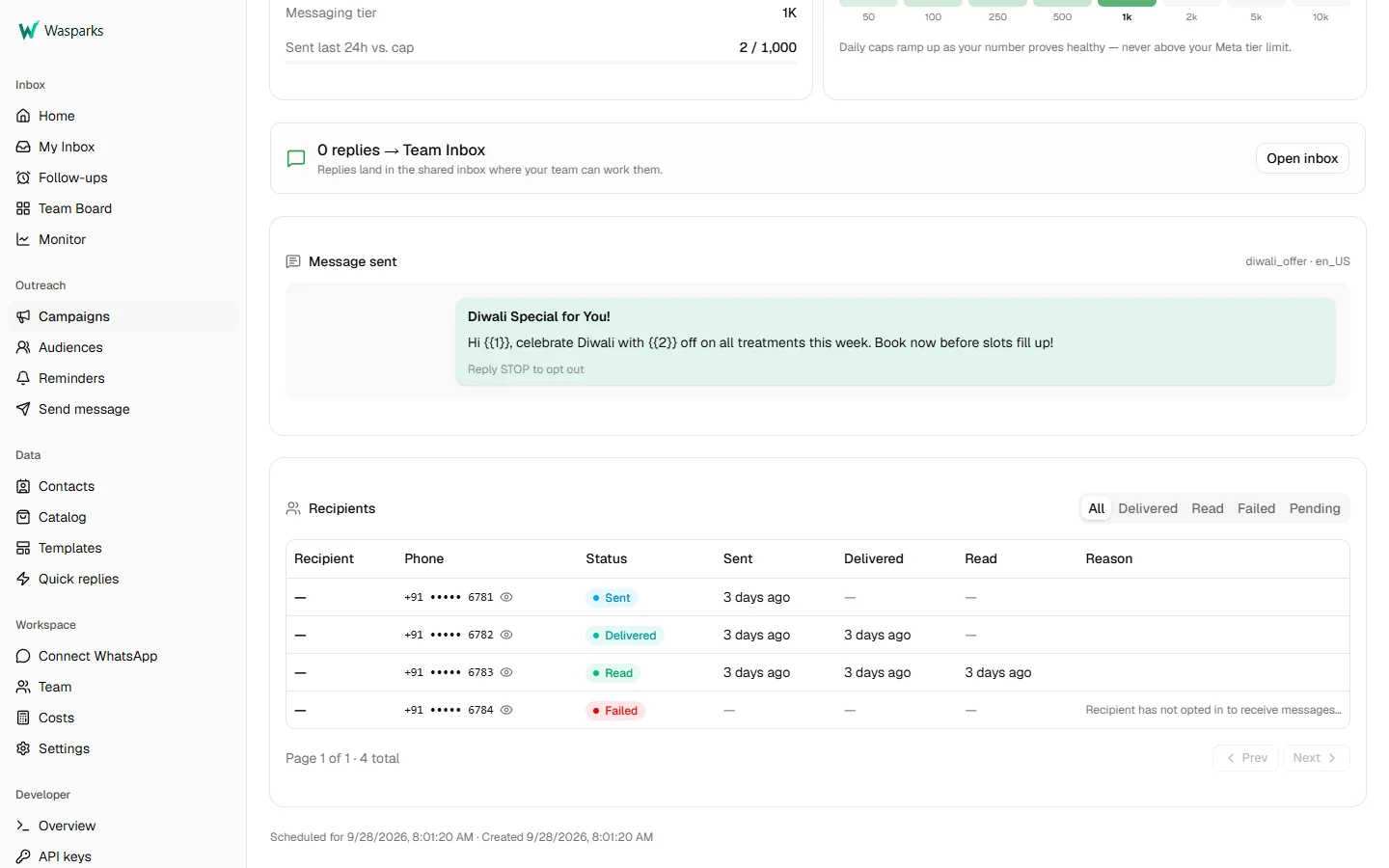
WaSparks campaign detail showing the message sent and a recipient table with masked numbers and sent, delivered, read and failed statuses, including a failure reason
CSV to send
Upload a CSV, map its columns to template variables, and schedule.
Paced to your limits
Sending respects your Meta messaging tier and daily caps.
Warm-up for new numbers
Volume ramps up gradually and only advances on real sends.
Pauses on poor quality
If your quality rating drops, sending pauses on its own.
Per-recipient detail
Sent, delivered, read or failed for each person, with failure reasons. Numbers stay masked unless you’re an Owner or Admin.
Replies come back
Replies land in the team inbox and are counted against the campaign.
STOP means stop
A customer who replies STOP is left out of every future campaign.

Audiences & contacts

Lists you build once and use again.

Saved audiences
Reuse a recipient list across campaigns.
Static lists
Upload a list and keep it as it is.
Dynamic segments
Define an audience by contact details, and it keeps itself up to date.
Contact records
A record for every customer, built from conversations and uploads.

Catalog & orders

Show products in the chat. Work orders in the inbox.

Your catalog, in WaSparks
Products and collections are managed in WaSparks and published to Meta.
The right format each time
Single-product, multi-product or full-catalog messages, with an image fallback.
Orders as work
Orders arrive in the inbox as items your team can pick up.

Reminders

Follow-ups that go out on time, without anyone having to remember.

Three kinds of trigger
A date, a repeating schedule, or an event.
Presets
Start from common reminder patterns.
Quiet hours
Nothing goes out during the hours you set.
Manual follow-ups
Schedule a one-off nudge for a single customer.

Chat flows

Automation you can see.

Visual canvas
Build menus, questions and hand-offs on a canvas you can read at a glance.
Presets
Start from a welcome menu, after-hours reply, lead capture, price list or order confirmation, and change anything.
Run log
Every conversation a flow handles is logged step by step.

More about chat flows →

Flint

One assistant, two jobs.

Flint drafts for you
Templates, quick replies, product copy and product picks, drafted for you to review, edit and save. Free on every plan.
Flint answers your customers (pilot)
Answers inside the 24-hour window from your business profile, FAQ and catalog, and hands the chat to your team when it isn’t sure. Ask us to switch it on.

More about Flint →

Cost visibility

Know Meta’s cost before you send, and the actual spend after.

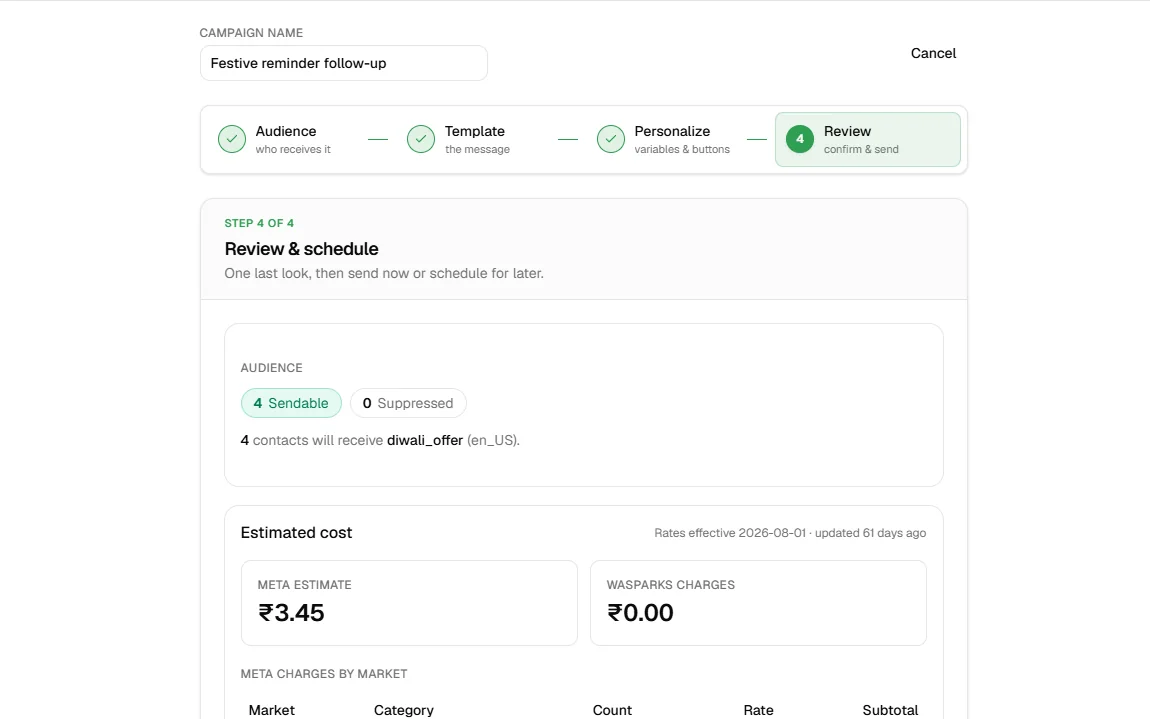
WaSparks campaign review step showing four sendable contacts and the estimated Meta cost in rupees before sending
Rate card
Meta’s rates by country and category, in rupees and dollars.
Estimate before sending
Every campaign shows its estimated cost at review.
Actual spend
What Meta charged, pulled on demand.
Billed on delivery
Messages Meta doesn’t deliver aren’t charged.
Plans and usage
See what you’ve used and add prepaid balance. On Spark and Blaze, the inbox never stops.

Account health

Your number’s standing with Meta, always in view.

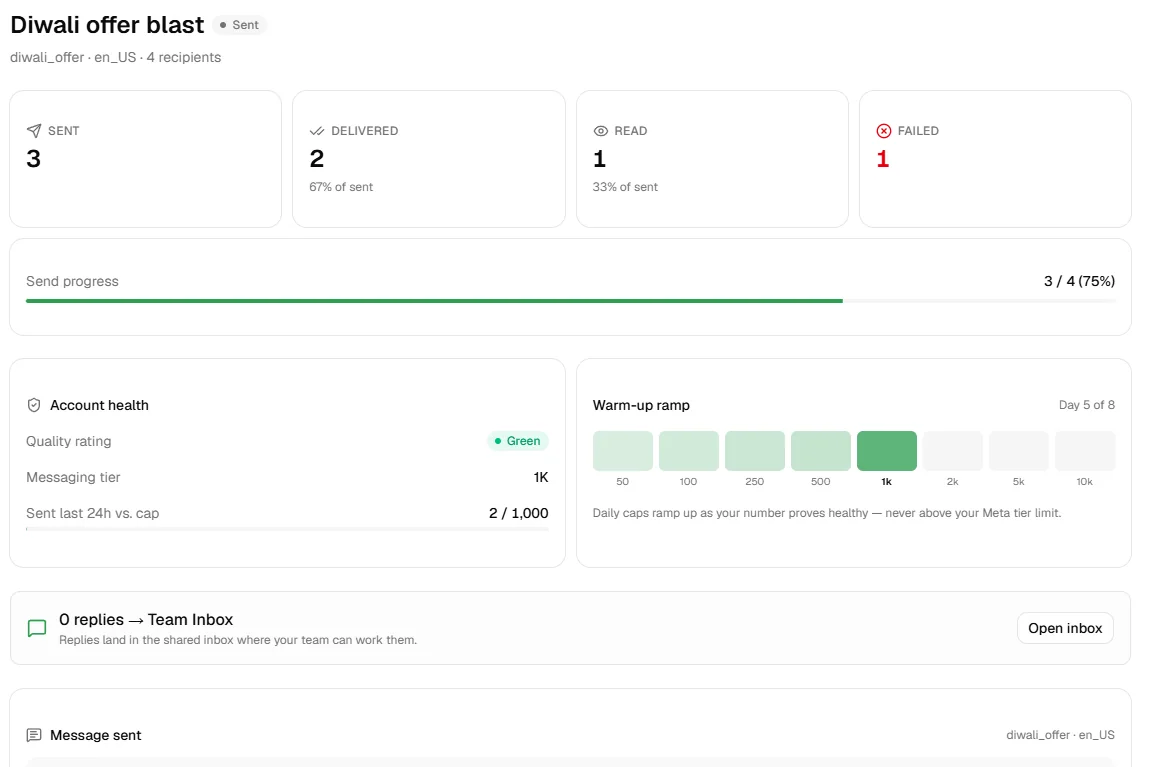
WaSparks campaign summary with sent, delivered, read and failed counts, a green quality rating, a 1K messaging tier and the warm-up ramp on day 5 of 8
Quality rating
Green, yellow or red, tracked from Meta.
Messaging tier
How many customers you can reach a day: 250, 1K, 10K and up.
Number status
Verified and live, shown where you work.
Embedded Signup
Connect a number through Meta’s own signup flow.
Two ways to connect
A dedicated number, or your existing WhatsApp Business app number, kept working alongside WaSparks.

Team & control

The controls an owner or IT team asks about first.

Business profile
One place for your hours, timezone and description. Flint, reminders, campaigns and after-hours replies all use it.
Roles and permissions
Decide who can see and do what.
Audit log
Every change recorded: what changed, who did it and when.
Tenant isolation
Each business’s data is kept separate from every other’s.
Account security
Invite-based activation and self-serve password reset.

Developers & partners

Run WaSparks from your own code, or run it for your clients.

REST API
Send messages with a Meta-compatible request shape, accepted asynchronously.
Signed webhooks
HMAC-signed events for message status, inbound messages and template changes.
Sandbox
Test without sending to real customers.
API keys in the app
Create and revoke keys yourself.
Partner console
Manage client businesses from one partner account, with hosted setup links.
API plans
Fixed and metered plans for programmatic use.

Read the API reference

Questions about the features.

Still unsure? Ask us.

Does Meta need to approve my templates?

Yes. Every template is reviewed by Meta before you can send it. WaSparks submits it for you and updates its status when Meta decides, including the reason if it’s rejected.

What is the 24-hour window?

When a customer messages you, you can reply freely for 24 hours. Outside that window, you can only start a conversation with an approved template. The WaSparks inbox shows which one applies.

Is Meta’s message cost included in my plan?

No. Meta charges per delivered message, depending on the category and the recipient’s country. WaSparks shows the estimate before you send and passes the cost through. Undelivered messages aren’t charged.

What happens when a customer replies STOP?

They’re removed from every future campaign on your account, automatically.

Can I use WaSparks through an API instead?

Yes. The API reference is public, there’s a sandbox for testing, and webhooks are HMAC-signed.

Start on your own number.

Try Ember free for 30 days. Connect your WhatsApp number and send your first template today.