 WaSparks
An agency manages WhatsApp for a dozen clients: a furniture store, two clinics, a coaching institute and a few online brands. Each client has its own number, its own templates and its own customers. The team logs in and out of separate accounts all day. On a busy Friday, someone schedules a festive broadcast and, by mistake, picks the wrong client’s list.
That mistake is rare, but when it happens it is expensive. Customers receive a message from a brand they never dealt with, and the client wants to know how it happened.
This guide explains how a multi-tenant platform prevents it, and what to look for if you run WhatsApp for several brands.
What “multi-tenant” means for an agency
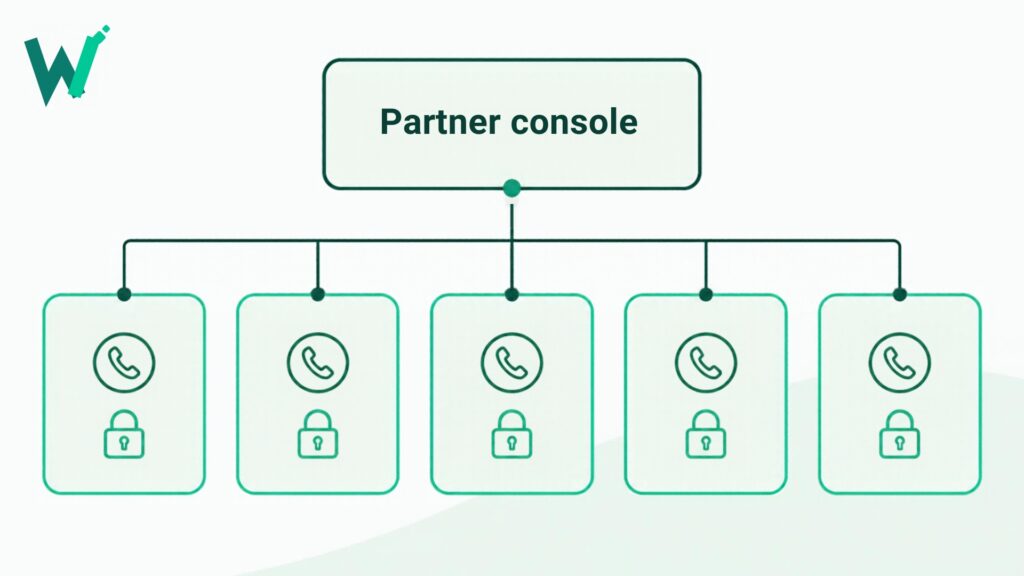
In a multi-tenant platform, each client business is its own space. Their contacts, conversations, templates and numbers are kept separate from every other client’s. You manage them from one partner account, but nothing crosses between them.
WaSparks describes this as tenant isolation: each business’s data is kept separate from every other’s.
The problems agencies run into
Too many logins. Switching between accounts wastes time and invites mistakes.
Cross-client mix-ups. A wrong list, wrong template or wrong number is easy to select when everything sits in one workspace.
Slow client onboarding. Waiting for a client’s technical contact to connect a number can hold up a project for days.
Unclear access. A freelancer or junior team member who should only see one client ends up seeing all of them.
What to look for in a partner platform
One console, many client businesses
You should be able to see and manage every client from a single partner account, while each client stays in its own space.
Easy number onboarding
WaSparks’s partner console lets you manage client businesses and onboard their numbers with hosted setup links. You send the client a link, they connect their number through Meta’s own signup flow, and you can get started on their campaigns and inbox.
Roles and permissions
Decide who can see and do what. Roles let you give a team member access to the clients they work on and nothing else. An audit log records what changed, who did it and when, which is useful when a client asks what happened.
API access
If you build for clients, the REST API sends messages in a Meta-compatible request shape, and signed webhooks report message status, inbound messages and template changes. A sandbox lets you test without sending to real customers, and API keys are created and revoked in the app.
Pricing that suits an agency
WaSparks partners use Catalyst, which comes in fixed or metered forms and is arranged with our team. Meta’s own per-message charges are billed to each client’s WhatsApp account by Meta, not by us. That makes it easier to show a client exactly what they pay Meta and what they pay you.
See it live: See how a brand-side WhatsApp conversation looks to the customer. Tap here to test on WhatsApp (replies in under 5 seconds)
A working model for 15 clients
- Create a client workspace for each brand. Keep the naming consistent so your team recognises it quickly.
- Onboard the number with a hosted setup link. Do not ask the client to share passwords.
- Set roles per team member. Account managers see their own clients. Owners see all.
- Build a template library per client, each approved by Meta under that client’s number.
- Estimate before sending. Every campaign shows its estimated Meta cost at review. Share that with the client before launching.
- Review account health weekly. Quality rating and messaging tier are visible for each number, so you can spot a drop before the client does.
Good practice to avoid mix-ups
- Work in one client’s space at a time, and close it before opening another.
- Name lists and campaigns with the client and date.
- Check the sender number on every campaign review.
- Never reuse a template between clients without checking the wording.
- Keep opt-out rules strict: a customer who replies STOP is left out of every future campaign on that account.
Questions to ask any platform
- Is each client’s data separate from every other client’s?
- How does a client connect their number, and does it stay in their ownership?
- Can I restrict a team member to certain clients?
- Is there a record of who changed what?
- How are Meta’s charges billed, and can the client see them?
The takeaway
Running WhatsApp for many brands is manageable when each client has its own space, onboarding is simple, and access is controlled by role. If you want to talk through an agency setup, contact us about partnering, or read the features overview.
Found this useful? Share it with your team.